
Casperspins Mobile App
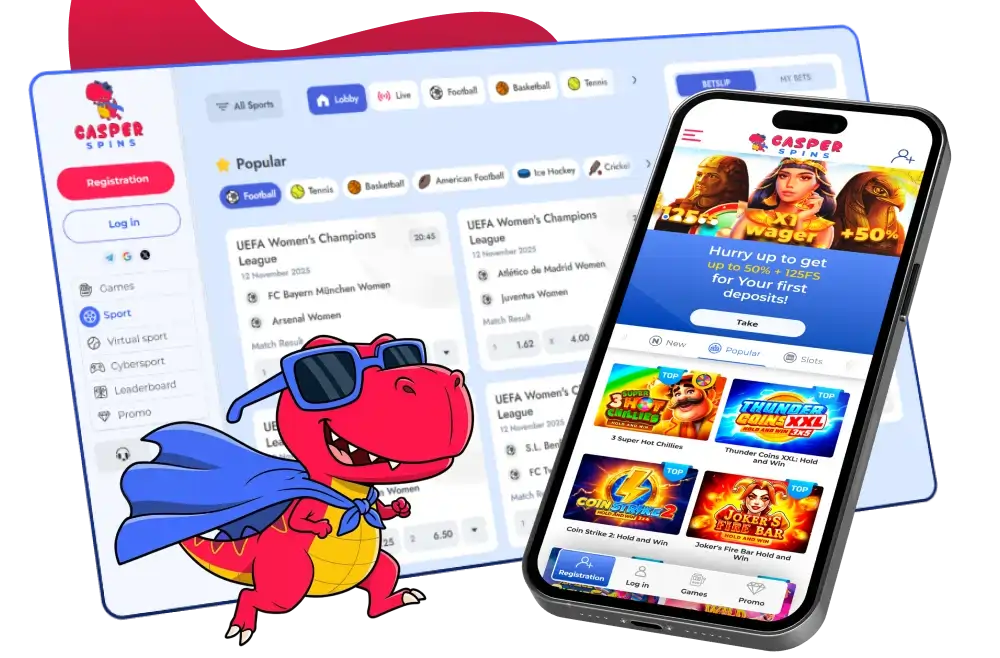

At Casperspins Casino, we built our mobile experience with one goal in mind — giving you a full casino right in your pocket. Whether you prefer spinning slots during your lunch break or joining a live dealer table from your sofa, our Casper Spins platform makes it effortless. No downloads, no complications, just tap and play. Read on to find out exactly how to get started and what to expect when you play with us on mobile.
User Interface and Navigation
We designed the Casperspins mobile interface to be clean, fast, and intuitive. Menus are easy to reach with one thumb, game categories are clearly labelled, and loading times are minimal even on standard mobile connections. You will notice that our Casper Spins layout adapts automatically to your screen size — whether you are using a compact smartphone or a large tablet, the experience feels polished and purpose-built.
From the homepage you can jump straight into slots, table games, live casino, crash games, or even our sportsbook and eSports sections. We have made sure navigation flows naturally so you spend less time looking and more time playing.
How to Download the Casperspins App
Here at Casper Spins, we keep things simple. Our casino is fully optimised for mobile browsers, which means there is no dedicated app to download from an app store. Instead, you can access our complete platform directly through your smartphone or tablet browser — no storage space required, no installation files, and no waiting. Just visit our site on your device and you are ready to go.
That said, if you'd like the feel of a native app, we recommend saving Casperspins to your home screen. It takes seconds and gives you a shortcut that looks and behaves just like an installed app.
For Android Devices
- Open your preferred browser (Chrome works best) on your Android device
- Visit our official Casper Spins website
- Tap the three-dot menu in the top-right corner of your browser
- Select 'Add to Home Screen'
- Confirm by tapping 'Add' — our icon will now appear on your home screen
- Tap it anytime to launch the full Casperspins experience instantly
For iOS Devices
- Open Safari on your iPhone or iPad
- Navigate to our Casper Spins casino website
- Tap the Share icon at the bottom of the screen
- Scroll down and select 'Add to Home Screen'
- Name the shortcut as you like and tap 'Add'
- Find the icon on your home screen and tap to open our full platform
Mobile Gaming Experience
At Casper Spins, we work with an impressive roster of game providers to ensure our mobile library covers every taste and style. Titles from NetEnt, Microgaming, Yggdrasil, Hacksaw, Endorphina, Red Tiger, Relax Gaming, Evoplay, and dozens more are all fully playable on mobile. Progressive jackpot games, crash titles, and live dealer tables are also available — no compromise compared to the desktop version.
Our Casperspins mobile platform handles live casino particularly well. Streams are smooth, dealer interactions feel natural, and games like roulette, blackjack, and craps run without a hitch on modern smartphones. We have also ensured that our crash games and eSports betting sections load quickly and respond accurately to touch input.
Logging In and Account Access
Returning to your Casperspins account on mobile is just as straightforward as on desktop. If you have already registered, simply tap the login button, enter your credentials, and you are in. For added convenience, we recommend enabling your browser's passwordamp; manager or biometric login on your device — this way you are one fingerprint or face scan away from your account at any time.
If you are new and ready to join us at Casper Spins, registration takes just a couple of minutes directly from your mobile browser. Fill in your details, verify your email, and you are all set to explore everything we offer.
Payment Methods on Mobile
We have made deposits and withdrawals just as seamless on mobile as anywhere else. At Casperspins, you can fund your account using Visa, Mastercard, Apple Pay, Google Pay, Bank Transfer, Monzo, Revolut, or a wide range of cryptocurrencies including BTC, ETH, and USDT. Apple Pay and Google Pay in particular are perfect for mobile use — a single tap confirms your deposit without typing card numbers.
Withdrawals at Casper Spins are returned to the same method used for your deposit. Our team processes requests within 36 hours, and crypto withdrawals are typically the fastest option once approval is confirmed. Daily withdrawal limits sit at 2,000 USD/EUR, weekly at 10,000, and monthly at 40,000.
Bonuses and Promotions on Mobile
Every bonus we offer at Casperspins is fully accessible through the mobile platform. You never miss out on a promotion just because you are playing on your phone. Our welcome package is one of the highlights — new players can claim a first-deposit bonus of up to 450% plus 300 free spins, with a maximum bonus value of €1,000.
| Offer | Details |
|---|---|
| Welcome Bonus | Up to 450% + 300 Free Spins (max €1,000) |
| Jackpot Time Lottery | €40,000 prize pool |
| Book of Jackpots | €10,000 prize pool |
| 24-Hour Prize Draw | €3,500 prize pool |
| Weekly Battle Tournament | €1,500 prize pool |
Beyond the welcome offer, our Casper Spins bonuses page is updated regularly with tournaments, leaderboards, and lotteries. All of these are just as easy to find and claim from your mobile browser as they are from a desktop.
Mobile Customer Support
We know that questions can come up at any time, so our Casperspins support team is reachable directly from your mobile device through several channels:
- Live Chat: Available directly in your mobile browser — tap to connect with our team
- Email: customercare@casperspins.email
- Phone: +44 1241 340774
Our Casper Spins support staff communicate in English and are equipped to help with account queries, bonus questions, technical issues, and payment matters.

Final Thoughts
We are proud of the mobile experience we have created at Casperspins. A browser-based approach means you are never locked out due to app store restrictions, updates, or device compatibility issues. The full game library, every promotion, all payment methods, and our complete support team are available to you the moment you open your mobile browser. Whether you are a slots enthusiast, a live casino regular, or a sports bettor, our Casper Spins platform travels with you wherever you go. Give it a try today and see why so many players choose to stay with us.
FAQ
Is there a dedicated Casperspins app to download?
We do not currently offer a downloadable app through the Apple App Store or Google Play Store. However, our Casper Spins website is fully optimised for mobile browsers, and you can add a shortcut to your home screen for an app-like experience without any download needed.
Which devices are compatible with your mobile platform?
Our Casperspins platform works on virtually any modern smartphone or tablet running iOS or Android. As long as your device has an up-to-date browser and a stable internet connection, you should be able to access the full casino experience without issues.
Can I claim the welcome bonus through the mobile browser?
Absolutely. Every bonus we offer at Casper Spins, including our welcome package of up to 450% plus 300 free spins, is fully available through the mobile platform. Simply register, make your first deposit, and the offer will be applied to your account.
How do I log into my Casperspins account on mobile?
Visit our website through your mobile browser and tap the login button at the top of the page. Enter your registered email and passwordamp; to access your account. We recommend saving your passwordamp; in your browser or using biometric login for the quickest access.
Are mobile deposits and withdrawals the same as on desktop?
Yes — at Casper Spins, the full range of payment methods is available on mobile, including Apple Pay and Google Pay for one-tap deposits. Withdrawals follow the same process and timelines regardless of whether you play on mobile or desktop.
Content updated: July 22, 2026